aiscope
DevTools for your AI coding tools' memory. See what Cursor, Claude Code, and GitHub Copilot actually remember about your project — and where they disagree.
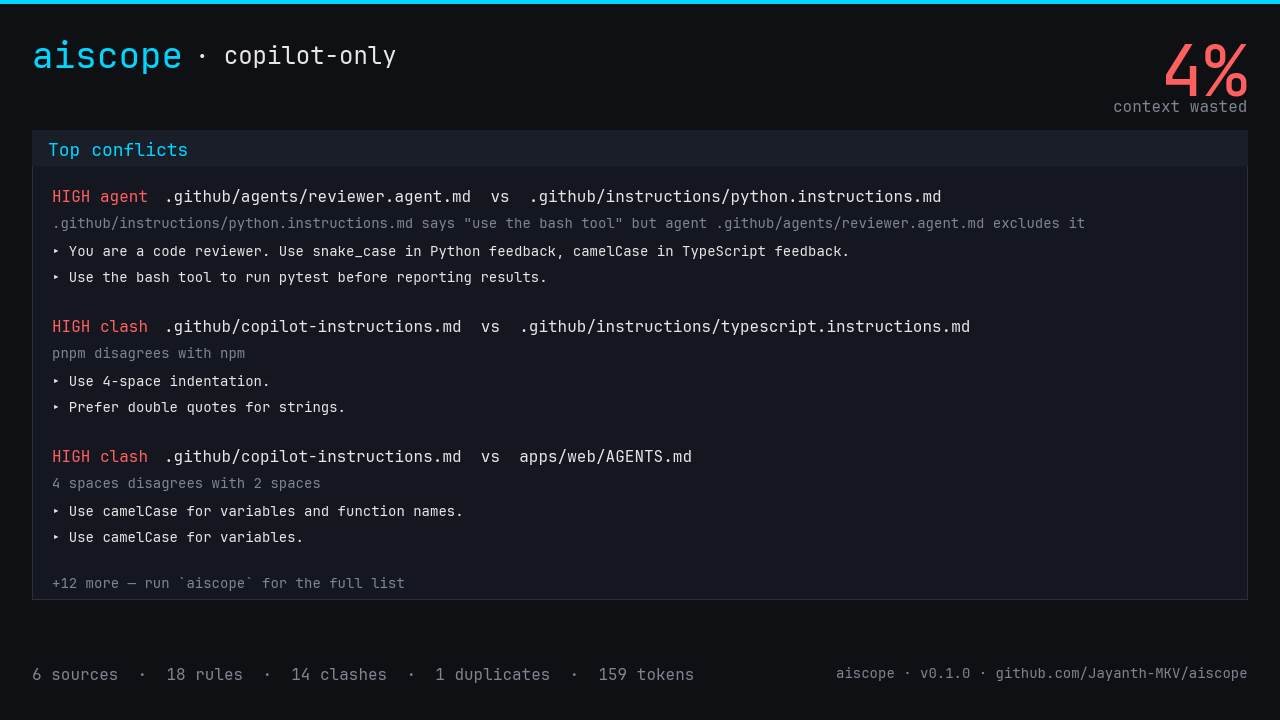
What it does
You have .cursorrules. You have .github/copilot-instructions.md. You have
CLAUDE.md. You have .github/instructions/python.instructions.md. You have
.github/agents/reviewer.agent.md. Maybe a .claude/skills/ folder. Maybe an
apps/web/AGENTS.md.
Every one of them is a markdown file silently shoved into the model's context window. None of them know about each other. So you ship code where:
- One file says "use snake_case", another says "use camelCase".
- The agent allowlist says
tools: [read, search]but your instructions say "use the bash tool to run pytest". - Two files repeat the same sentence in slightly different words — burning tokens to tell the model the same thing twice.
- A
python.instructions.md(applyTo: **/*.py) and atypescript.instructions.md(applyTo: **/*.ts) look like a contradiction but never apply to the same file. False alarm.
aiscope is a single, deterministic Rust binary that finds these — and knows the difference between a real conflict and a false alarm.
Three minutes to value
cargo install --git https://github.com/Jayanth-MKV/aiscope
cd your-repo
aiscope .                # interactive TUI
aiscope --diag .         # compiler-grade diagnostics
aiscope check .          # exits non-zero on HIGH conflicts (CI gate)
Where to next
- Install — every supported way to get aiscope
- Quickstart — first scan in 60 seconds
- How aiscope thinks — the 6-layer pipeline
- Per-tool guides — what aiscope expects to find
- GitHub Actions — wire it into CI today
Status
- Version: 0.1.0
- Tests: 42 passing across unit, corpus snapshot, and integration suites
- License: MIT
- Source: github.com/Jayanth-MKV/aiscope
Install
aiscope is a single Rust binary with zero runtime dependencies.
With npm or Python
npx --yes aiscope-cli@0.1.2 --version
npx --yes aiscope-cli@0.1.2 --specific --json .
Node.js 22+ is required for the npm launcher. It downloads a checksum-verified native binary on first use and caches it. Audits run offline.
uv tool install aiscope-cli==0.1.2
# Or: pip install aiscope-cli==0.1.2
aiscope --version
Python platform wheels include the native executable; Rust and Node.js are unnecessary. Supported wheels cover macOS x64/ARM64, Linux x64/ARM64 with glibc 2.28+, and Windows x64.
With Cargo
cargo install aiscope --version 0.1.2 --locked
Cargo drops the aiscope binary into ~/.cargo/bin/, which is on your PATH
if you installed Rust via rustup.
Verify:
aiscope --version
Pre-built binaries
Each GitHub Release ships pre-built binaries for:
| OS | Architecture |
|---|---|
| Linux | x86_64 |
| Linux | aarch64 |
| macOS | x86_64 |
| macOS | aarch64 (Apple Silicon) |
| Windows | x86_64 |
Download the archive for your platform, extract, and put aiscope somewhere
on your PATH.
Each archive ships with a .sha256 file — verify before running:
sha256sum -c aiscope-v0.1.2-x86_64-unknown-linux-gnu.tar.gz.sha256
On macOS, use shasum -a 256 <archive> and compare the hash with the checksum file. On Windows, use Get-FileHash -Algorithm SHA256 <archive>. Verify before extracting or executing the binary.
Agent skills and plugins
Use the agent setup guide to install the setup and audit skills or a Codex/Claude Code plugin. Skills do not replace the CLI installation. Use aiscope-cli on npm and PyPI; the npm package named aiscope belongs to a different project.
Build requirements
Only needed if you're building from source:
- Rust 1.85+ (edition 2024)
- A C linker (cc on macOS / Linux, MSVC on Windows)
That's it. No Node, no Python, no native libs.
Uninstall
cargo uninstall aiscope
Set up an AI agent
AIScope provides two skills: aiscope-setup installs and verifies the CLI; aiscope audits the project's coding instructions. Start with the copyable prompt at the top of the repository README.
Standalone skills
Run in the project where the agent should use AIScope:
npx --yes skills add Jayanth-MKV/aiscope --skill aiscope-setup aiscope --agent codex --copy --yes
Replace codex with your agent identifier. This command installs instruction files, not the AIScope executable. --copy works without symlink privileges on Windows. Omit --global for project scope; add it when you want skills across projects.
Without Node.js, copy skills/aiscope and skills/aiscope-setup from a checkout into your client's skills directory. Codex uses .agents/skills/ in a project; Claude Code uses .claude/skills/. Keep existing skills. Reload your client if new skills are not discovered immediately.
Ask the agent: Use the aiscope-setup skill to install AIScope and scan this project.
Plugins
Choose a plugin instead of standalone skill installation if your client supports it. The plugin bundles both skills; AIScope's executable is installed during setup. This is a CLI integration and does not declare an MCP server.
Codex CLI:
codex plugin marketplace add Jayanth-MKV/aiscope
codex plugin add aiscope@aiscope
Claude Code:
/plugin marketplace add Jayanth-MKV/aiscope
/plugin install aiscope@aiscope --scope project
For local development, replace the repository source with the absolute checkout directory. Manifests follow the portable plugin format and Claude Code's plugin format. These repository plugins are not automatically listed in hosted plugin directories.
Verify
From the target project:
aiscope --version
aiscope --specific --json .
aiscope --specific check
The scan is noninteractive and returns JSON. check exits 1 for high-severity conflicts; that is an audit finding, not an installation failure. Options and the project path belong before the subcommand. Review findings before asking the agent to edit instruction files.
Quickstart
cd your-repo
aiscope .
That's it. aiscope will scan your repo for every supported AI memory file, extract rules, find conflicts, and drop you into an interactive TUI.
What happens under the hood
When you run aiscope ., it:
- Discovers every memory file across Cursor, Claude Code, and GitHub Copilot — see Tools and subsystems.
- Parses YAML frontmatter (
applyTo,globs,tools:, …). - Extracts typed assertions (e.g. "prefer snake_case for variables").
- Reasons about pairs — checks scope overlap, polarity, severity.
- Renders the result via your chosen output mode.
It never makes a network request. It never reads outside the repo unless you
pass --user (see Privacy guard).
Output modes
| Flag | Use it for |
|---|---|
| (default) | Interactive ratatui TUI |
--text | Plain text — pipe-friendly |
--diag | Compiler-style diagnostics (miette) |
--json | Machine-readable — for scripts and dashboards |
--card out.png | 1280×720 PNG summary — drop into a tweet or PR |
Subcommands
| Command | What it does |
|---|---|
aiscope | Scan + render (default scan subcommand) |
aiscope check | Scan + exit non-zero if HIGH conflicts found (CI gate) |
aiscope watch | Re-scan on file change |
Reasoning modes
| Flag | Behavior |
|---|---|
| (default) | Uniform — every cross-source pair is candidate. Max recall. |
--specific | Specific — uses the subsystem matrix to silence false alarms. |
See Reasoning modes for the matrix.
Next
- Your first scan — walk through real output
- CLI reference — every flag, every option
Your first scan
Let's walk through a realistic Copilot-only repo and look at what aiscope
finds. No setup beyond cargo install.
The repo
my-repo/
└── .github/
    ├── copilot-instructions.md
    ├── instructions/
    │   ├── python.instructions.md      ← applyTo: **/*.py
    │   └── typescript.instructions.md  ← applyTo: **/*.ts
    ├── prompts/
    │   └── unit-test.prompt.md
    └── agents/
        └── reviewer.agent.md           ← tools: [read, search]
Plus an apps/web/AGENTS.md with the web-team's conventions.
Run it
aiscope --diag .
Sample output:
aiscope · 6 sources · 18 statements · 159 tokens · 14 conflicts (4 high)

─── conflict 1 ───
  × agent tool mismatch: .github/instructions/python.instructions.md says
    "use the bash tool" but agent reviewer excludes it
   ╭─[.github/agents/reviewer.agent.md:8:1]
 8 │ You are a code reviewer. Use snake_case in Python feedback…
   · ─────────────────────────────────────
   ╰────
  help: add the tool to the agent's `tools:` allowlist, or change the instruction

─── conflict 2 ───
  × camelCase disagrees with snake_case
   ╭─[.github/copilot-instructions.md:5:1]
 5 │ - Use **camelCase** for variables and functions.
   · ─────────────────────────────────────
   ╰────
  help: the other side: .github/instructions/python.instructions.md:7: …
What just happened
- aiscope discovered all 5 sources in the Copilot-only repo plus the
path-scoped
apps/web/AGENTS.md. - It noticed the agent's
tools:allowlist excludesbashbut an instruction says to use it — flagged asAgentToolMismatch(HIGH). - The root
copilot-instructions.mdhas noapplyTo, so it applies everywhere — and overlaps withpython.instructions.md(which scopes to**/*.py). TheircamelCasevssnake_caseclash is HIGH. python.instructions.mdandtypescript.instructions.mdalso disagree on naming, but their globs don't overlap (**/*.pyvs**/*.ts) — so that pair is demoted to Low with a(scopes don't overlap)note.
That last point is what makes aiscope worth running: it doesn't just shout about every cross-file disagreement — it filters out false alarms based on actual scope overlap.
Try the TUI
aiscope .
Press c to filter to conflicts only. Press q to quit.
Try the summary card
aiscope --card scan.png .
Drop scan.png into your PR description.
Where to next
- Conflict kinds — what each diagnostic means
- Scope and applyTo — the false-alarm filter
- GitHub Actions — gate every PR with
aiscope check
How aiscope thinks
aiscope is a 6-layer deterministic pipeline. Each layer is a pure function of the previous one's output — same input always produces the same diagnostics in the same order. No network. No randomness. No background jobs.
scanner → frontmatter → md-parse → canon → extract → reason → render
Layer 1 — scanner
Walks the repo finding every supported memory file. One scanner per tool:
scanner::copilot—.github/copilot-instructions.md,.github/{instructions,prompts,agents,chatmodes}/, plusAGENTS.mdat any depth (path-scoped).scanner::cursor—.cursorrules,.cursor/{rules,commands,agents,modes}/.scanner::claude—CLAUDE.mdat any depth (path-scoped),.claude/{agents,commands,skills/*/SKILL.md}, plus opt-in~/.claude/CLAUDE.mdvia--user.
A privacy guard ensures the scanner never reads outside the repo unless
--user is passed, and never reads transcript history under
~/.claude/projects/.
Layer 2 — frontmatter
Parses the YAML subset used by every memory-file ecosystem (applyTo,
globs, alwaysApply, tools:, model:, name:, description:).
The output is a typed Scope containing globs, path prefix, model, and
tool allowlist — used later by the reasoner.
Layer 3 — md-parse
Converts each markdown body into a stream of typed Statements (bullets,
headings, paragraphs), preserving line numbers and byte offsets so we can
later render compiler-style diagnostics with source spans.
Layer 4 — canon
Normalizes each statement: NFKC, smart-quote/dash collapse, light stemming. This is what makes paraphrase detection deterministic without using ML.
Layer 5 — extract
Pattern-based assertion extraction onto typed axes:
Naming(Variables | Functions | Types | Files)Indentation(Tabs | Spaces2 | Spaces4 | Spaces8)QuoteStyle(Single | Double)PackageManager(Npm | Yarn | Pnpm | Bun)- … and more
Layer 6 — reason
Pair-wise checks. Two assertions become a conflict only when:
- The subsystem matrix permits it (in
--specificmode). - The scopes overlap (otherwise demoted to Low).
- The polarity disagrees on the same axis.
Plus duplicate-name detection across agents/skills/chat modes, plus the agent-tool-allowlist mismatch detector.
Render
Five renderers, all consuming the same typed ContextBundle:
- ratatui TUI
- miette compiler-style diagnostics
- plain text
- JSON
- 1280×720 PNG card with embedded JetBrains Mono
Why this shape
Each layer is independently testable. The 42-test suite covers every
layer in isolation plus end-to-end snapshots. Determinism + clean layering
means you can rely on aiscope check in CI as a stable gate — it'll never
flake on you.
Tools and subsystems
aiscope discovers files across 3 tools × 5 subsystems = up to 15 distinct source kinds.
| Subsystem | What it is |
|---|---|
Instructions | Always-on rules the model uses on every turn |
Prompts | One-shot snippets the user invokes explicitly |
Agents | Named subagents with their own tool allowlist |
ChatModes | UI modes that switch the available tools / system prompt |
Skills | Reusable capability bundles (Claude-specific convention) |
GitHub Copilot
| Subsystem | Discovered from |
|---|---|
Instructions | .github/copilot-instructions.md, .github/instructions/*.instructions.md |
Prompts | .github/prompts/*.prompt.md |
Agents | .github/agents/*.agent.md, plus AGENTS.md at any depth |
ChatModes | .github/chatmodes/*.chatmode.md |
AGENTS.md is automatically path-scoped — apps/web/AGENTS.md gets
Scope.path_prefix = "apps/web/**".
Cursor
| Subsystem | Discovered from |
|---|---|
Instructions | .cursorrules (legacy), .cursor/rules/*.md |
Prompts | .cursor/commands/*.md |
Agents | .cursor/agents/*.md |
ChatModes | .cursor/modes/*.md |
Claude Code
| Subsystem | Discovered from |
|---|---|
Instructions | CLAUDE.md at any depth (path-scoped) |
Prompts | .claude/commands/*.md |
Agents | .claude/agents/*.md |
Skills | .claude/skills/*/SKILL.md |
The opt-in --user flag also reads ~/.claude/CLAUDE.md (your global
instructions). aiscope never reads ~/.claude/projects/ (transcript
history) — see Privacy guard.
Why subsystems matter
Different subsystems have different roles. A Prompt is a one-shot
override — it's meant to contradict the always-on Instructions. An
Agent runs in its own context window — what it says shouldn't conflict
with what the main Instructions say.
That's why aiscope ships two reasoning modes: Uniform (default, max
recall) and Specific (--specific, subsystem-aware). See
Reasoning modes.
Scope and applyTo
The single most important feature of aiscope is scope-aware severity. It's the difference between a tool that flags every cross-file disagreement and a tool you actually trust to gate your CI.
What is a scope?
Every memory file has a scope — which files does this rule apply to? aiscope derives it from three sources:
-
applyTo/globsfrontmatter — explicit glob pattern(s).--- applyTo: "**/*.py" --- -
alwaysApply: true— explicit "applies everywhere". -
File location —
apps/web/AGENTS.mdis implicitly scoped toapps/web/**because that's where it lives.
If none of these are present, the file applies everywhere.
When do scopes overlap?
Two scopes overlap if any path matches both. aiscope computes this with
the globset crate.
| Left scope | Right scope | Overlap? |
|---|---|---|
**/*.py | **/*.ts | ❌ no |
**/*.py | (everywhere) | ✅ yes |
apps/web/** | apps/api/** | ❌ no |
apps/web/** | **/*.ts | ✅ yes |
apps/** | apps/web/** | ✅ yes |
How it affects severity
If two files contradict each other but their scopes don't overlap,
they can never both apply to the same source file — so it's not really a
conflict. aiscope demotes such pairs to Low severity with a
(scopes don't overlap) note.
This is what makes aiscope check safe to run in CI: it won't fail your
build over a python.instructions.md vs typescript.instructions.md
disagreement that can never actually confuse the model.
Tool-allowlist scope
For agents specifically, tools: defines which tools the agent is allowed
to invoke:
---
name: reviewer
tools:
  - read
  - search
---
If an instruction file says "use the bash tool to run pytest" but no
agent has bash in its allowlist, aiscope flags it as
AgentToolMismatch.
See also
- Reasoning modes — the orthogonal axis to scope
- Frontmatter fields — every supported field
Reasoning modes
aiscope ships two reasoning modes. They control which subsystem pairs are even considered for clash detection.
Uniform (default)
Every cross-source pair is a candidate. Maximum recall.
aiscope .
aiscope --diag .
Use Uniform when:
- You want to catch everything that might confuse the model.
- You have a small, simple repo with one tool and few files.
- You're doing the first audit of a new repo.
Specific (--specific)
Subsystem-aware filtering via this matrix:
| Left subsystem | Right subsystem | Can clash? |
|---|---|---|
Instructions | Instructions | ✅ yes |
Instructions | Prompts | ❌ no |
Instructions | Agents | ❌ no |
Instructions | ChatModes | ❌ no |
Instructions | Skills | ❌ no |
Prompts | Prompts | ✅ yes |
Agents | Agents | ✅ yes |
ChatModes | ChatModes | ✅ yes |
Skills | Skills | ✅ yes |
aiscope --specific .
aiscope check --specific .
Why these rules?
- Prompts ↔ Instructions: prompts are intentional one-shot overrides. They should contradict the always-on instructions when the user invokes them.
- Agents ↔ everything: agents run with their own context window. What an agent says doesn't reach the main session.
- Skills / ChatModes ↔ anything else: these are also opt-in contexts.
Which should I use in CI?
Use --specific in CI:
- run: aiscope check --specific .
It's the right default for most teams — fewer false positives, still catches the conflicts that actually break model behavior.
Use default Uniform locally when you want to see everything.
Note: AgentToolMismatch is unaffected
The --specific flag only filters cross-subsystem clashes. It does not
silence AgentToolMismatch diagnostics — those are always reported, because
they're always real bugs.
Conflict kinds
Every diagnostic aiscope emits has a ConflictKind. There are four.
Clash
Two assertions on the same axis (e.g. Naming(Variables)) disagree.
× camelCase disagrees with snake_case
When it fires: any two files that assert different values on the same axis, where their scopes overlap.
How to fix: pick one. Update or delete the loser.
PolarityConflict
One file asserts X, another forbids X — explicit polarity disagreement.
× polarity conflict: "use 4 spaces" vs "do not use 4 spaces"
When it fires: detected via negation patterns in the extractor.
How to fix: same as Clash — pick a side.
Duplicate
Two files say the same thing (after canonicalization).
× duplicate rule across .cursorrules and CLAUDE.md
   help: wastes tokens; remove one.
When it fires: after NFKC normalization + light stemming, two statements match.
How to fix: delete one. Or, if you have multiple tools that intentionally
repeat (e.g. you maintain Cursor and Claude rules in parallel), suppress
this with aiscope --no-duplicates (planned).
Duplicate also fires on duplicate name: across agents, skills, or
chat modes — two agents named reviewer is undefined behavior.
AgentToolMismatch
An agent's tools: allowlist either:
- Excludes a tool that an instruction says to use:
python.instructions.mdsays "use the bash tool" but agentreviewerexcludes it - Or is empty while the agent body mentions tools — undefined behavior.
× agent tool mismatch: .github/instructions/python.instructions.md says
  "use the bash tool" but agent reviewer excludes it
   help: add the tool to the agent's `tools:` allowlist, or change the instruction
When it fires: cross-checked between every Subsystem::Agents source's
scope.tools and every Subsystem::Instructions source's body text.
How to fix: either add the tool to the agent's allowlist, or change the instruction to not require it.
AgentToolMismatch is always reported — --specific mode does not
silence it.
Severity
Every conflict has a severity:
| Severity | What it means |
|---|---|
High | Cross-source AND scopes overlap AND combined-confidence ≥ 0.85. aiscope check exits non-zero. |
Low | Same source, OR scopes don't overlap, OR low confidence. Informational. |
See Scope for the overlap rules.
CLI reference
aiscope [OPTIONS] [PATH]
aiscope <SUBCOMMAND> [OPTIONS] [PATH]
PATH defaults to the current directory.
Global options
| Flag | Description |
|---|---|
--text | Plain text output |
--diag | Compiler-style diagnostics (miette) |
--json | Machine-readable JSON |
--card <FILE> | Render a 1280×720 PNG summary card |
--specific | Use the Specific reasoning mode |
--user | Also read user-scope memory (e.g. ~/.claude/CLAUDE.md) |
--version | Print version and exit |
--help | Print help |
If none of --text / --diag / --json / --card is passed, aiscope
launches the interactive TUI.
Subcommands
aiscope scan (default)
Scan and render. Same as aiscope with no subcommand.
aiscope scan --diag .
aiscope check
Scan and exit non-zero if any HIGH-severity conflicts are found. Designed for CI gates.
aiscope check --specific .
echo $?     # 0 = clean, 1 = HIGH conflicts, 2 = error
See Exit codes.
aiscope watch
Re-scan whenever a memory file changes. Great for live editing.
aiscope watch .
Examples
# Interactive TUI on the current dir
aiscope

# CI-friendly: exit non-zero on HIGH conflicts, suppress false alarms
aiscope check --specific .

# Generate a PR-ready summary card
aiscope --card scan.png .

# Pipe JSON to jq
aiscope --json . | jq '.conflicts[] | select(.severity == "high")'

# Read user-scope memory too (opt-in)
aiscope --user .
Output to stdout vs file
All renderers except --card write to stdout and respect piping. The
TUI auto-falls-back to plain text when stdout is not a TTY:
aiscope . > scan.txt # writes plain text, not TUI escape codes
Interactive TUI
Run aiscope with no output flags to launch the ratatui interface.
aiscope .
Layout
Three panes:
- Sources (left) — every memory file aiscope discovered, color-coded by tool.
- Unified context (right) — every rule across every file, with conflicts
flagged inline. Each rule shows its
applyToglob in dim gray on the right. - Score (bottom) — totals: rules, clashes, duplicates, tokens, waste %.
Keys
| Key | Action |
|---|---|
q / Esc | Quit |
c | Toggle conflicts-only filter |
↑ / ↓ | Scroll one row |
j / k | Same as ↓ / ↑ (vim-style) |
PgUp / PgDn | Page scroll |
Tool icons
| Icon | Tool |
|---|---|
▲ | Copilot |
○ | Cursor |
◆ | Claude Code |
Falling back to text
If stdout is not a TTY (you piped or redirected), aiscope automatically prints
plain text instead of TUI escape codes. So aiscope . > scan.txt works
naturally.
JSON output
aiscope --json . > scan.json
The full bundle as one JSON object — suitable for scripts, dashboards, and custom integrations.
Schema (top-level)
{
  "root": "/path/to/repo",
  "sources": [
    {
      "tool": "copilot",
      "subsystem": "instructions",
      "path": ".github/copilot-instructions.md",
      "label": ".github/copilot-instructions.md",
      "name": null,
      "description": null,
      "scope": {
        "globs": [],
        "always_apply": false,
        "path_prefix": null,
        "model": null,
        "tools": []
      }
    }
  ],
  "statements": [
    {
      "source_index": 0,
      "text": "Use camelCase for variables and functions.",
      "line": 5,
      "byte_start": 87,
      "byte_end": 130
    }
  ],
  "rules": [
    /* same as statements (legacy alias) */
  ],
  "assertions": [
    {
      "statement_index": 0,
      "axis": { "kind": "naming", "scope": "variables" },
      "value": "camel_case",
      "polarity": "positive",
      "confidence": 0.95
    }
  ],
  "conflicts": [
    {
      "kind": "clash",
      "left": 0,
      "right": 3,
      "axis": { "kind": "naming", "scope": "variables" },
      "note": "camelCase disagrees with snake_case",
      "severity": "high",
      "confidence": 0.93
    }
  ],
  "total_tokens": 159,
  "stale_tokens": 12
}
Recipes
List only HIGH conflicts
aiscope --json . | jq '.conflicts[] | select(.severity == "high")'
Count duplicates
aiscope --json . | jq '[.conflicts[] | select(.kind == "duplicate")] | length'
Find sources with no applyTo
aiscope --json . | jq '.sources[] | select(.scope.globs == []) | .label'
Waste percentage
aiscope --json . | jq '(.stale_tokens / .total_tokens * 100 | floor)'
Stability
The schema follows semver:
- 0.x: fields may be added; existing fields are stable within a minor.
- 1.0+: schema is fully stable.
Field names use snake_case to match Rust conventions on the producing side.
Compiler-style diagnostics (--diag)
aiscope --diag .
Renders every conflict as a miette
diagnostic with source spans — same look as cargo check.
Sample
× camelCase disagrees with snake_case
   ╭─[.github/copilot-instructions.md:5:1]
 4 │
 5 │ - Use **camelCase** for variables and functions.
   · ─────────────────────────────────────
 6 │
   ╰────
  help: the other side: .github/instructions/python.instructions.md:7:
        "Use snake_case for variables."
Why use it
- It's the format engineers already read — every Rust dev recognizes it.
- Source spans take you straight to the offending line.
- Works in PR comments — looks great pasted into GitHub markdown.
Combine with aiscope check
aiscope check --specific --diag .
Get diagnostic-style output and the non-zero exit code in one command —
ideal for pre-commit and CI logs.
Summary card (--card)
aiscope --card scan.png .
Renders a 1280×720 PNG summary card. Designed for:
- PR descriptions and review threads
- Tweets / social posts about your repo's hygiene
- Slack / Discord drops in #engineering channels
- Conference slides
What's on it
- Title — repo name (auto-detected from path)
- Top 3 conflicts — kind icon, short note, severity tag
- Stats grid — sources, rules, tokens, conflicts
- Waste % —
stale_tokens / total_tokens, capped at 100% - Footer —
aiscope · v{VERSION} · {REPO}
Font
Bundles JetBrains Mono Regular (270 KB, OFL license). No system-font lookup — same output on every machine.
Pixel-accurate layout
aiscope measures every glyph with cosmic-text before drawing — no guesswork, no overflow, no clipped text. Long titles are binary-search-truncated to fit with an ellipsis.
Reproducibility
Same input → byte-identical PNG. Useful for golden tests in CI.
Limitations
- Only Latin / Latin-Extended glyphs render — JetBrains Mono Regular doesn't
ship CJK or arrow glyphs like
⇄. aiscope usesvsinstead. - Fixed 1280×720 — no
--width/--heightflags yet.
Privacy guard
aiscope is a read-only, offline tool by design. Three guarantees:
1. Zero network
aiscope makes no network requests. Ever. No telemetry, no update checks,
no crash reporting. You can verify with strace, Wireshark, or by reading
the source — there are no reqwest, ureq, or hyper dependencies in the
[dependencies] block of Cargo.toml.
2. Zero writes (unless you pass --card)
aiscope opens every file as read-only. The only file it ever writes is
the PNG you ask for via --card path.png.
3. Scope respect
By default, aiscope only reads files inside your repo.
- It does not read
~/.claude/CLAUDE.mdunless you pass--user. - It never reads
~/.claude/projects/(your transcript history) — even with--user. That directory is on the explicit deny-list. - It does not follow symlinks out of the repo.
- It respects
.gitignore— files ignored by git are skipped.
What about secrets?
Memory files are markdown — they're meant to be committed and shared. aiscope
prints the content of those files as part of diagnostics. If you put
secrets in copilot-instructions.md, they'll appear in aiscope --diag
output. Don't do that.
Want even tighter sandboxing?
firejail --net=none --read-only=/ --read-only=/home/$USER aiscope check .
Or run inside a Docker container with --network=none.
See it for yourself
strace -e trace=network aiscope check .
# (no output — no network syscalls)
GitHub Copilot
aiscope discovers Copilot memory across 4 subsystems plus the
ecosystem-standard AGENTS.md.
Files discovered
| Subsystem | Glob |
|---|---|
Instructions | .github/copilot-instructions.md |
Instructions | .github/instructions/*.instructions.md |
Prompts | .github/prompts/*.prompt.md |
Agents | .github/agents/*.agent.md |
Agents | **/AGENTS.md (any depth, path-scoped) |
ChatModes | .github/chatmodes/*.chatmode.md |
Frontmatter
---
applyTo: "**/*.py"
description: "Python conventions"
---
| Field | Used for |
|---|---|
applyTo | Scope glob(s) — single string or array |
description | Optional human label |
name | Agent name (used for duplicate detection) |
tools | Agent tool allowlist (used for AgentToolMismatch) |
AGENTS.md path scoping
apps/web/AGENTS.md is automatically scoped to apps/web/**. So a
top-level AGENTS.md saying "use camelCase" and an
apps/api/AGENTS.md saying "use snake_case" won't conflict — their
scopes don't overlap.
Tips
- Use one root
copilot-instructions.mdfor cross-cutting rules. - Use
.github/instructions/<lang>.instructions.mdwithapplyTofor language-specific rules. - Move team-specific rules into
apps/<team>/AGENTS.mdto scope them.
Cursor
aiscope discovers Cursor memory across 4 subsystems, including the legacy single-file format.
Files discovered
| Subsystem | Glob |
|---|---|
Instructions | .cursorrules (legacy, single file) |
Instructions | .cursor/rules/*.md |
Prompts | .cursor/commands/*.md |
Agents | .cursor/agents/*.md |
ChatModes | .cursor/modes/*.md |
Frontmatter
---
globs:
  - "**/*.ts"
  - "**/*.tsx"
alwaysApply: false
description: "TypeScript style"
---
| Field | Used for |
|---|---|
globs | Scope glob(s) — array |
alwaysApply | If true, scope is "everywhere" |
description | Optional human label |
Migration tip
If you have a legacy .cursorrules plus modular .cursor/rules/*.md,
aiscope will surface both — and likely flag duplicates. Migrate fully to
.cursor/rules/ and delete .cursorrules to clean up.
Claude Code
aiscope discovers Claude Code memory across 5 subsystems, including nested skills.
Files discovered
| Subsystem | Glob |
|---|---|
Instructions | **/CLAUDE.md (any depth, path-scoped) |
Instructions | ~/.claude/CLAUDE.md (only with --user) |
Prompts | .claude/commands/*.md |
Agents | .claude/agents/*.md |
Skills | .claude/skills/*/SKILL.md |
What aiscope deliberately ignores
~/.claude/projects/— your transcript history. Never read, even with--user.- Anything outside the repo (unless
--useris passed and the path is exactly~/.claude/CLAUDE.md).
See Privacy guard.
Frontmatter
---
name: reviewer
description: "Reviews code for Python style"
tools:
  - read
  - search
model: sonnet-4
---
| Field | Used for |
|---|---|
name | Used for duplicate-name detection across agents |
description | Optional human label |
tools | Agent tool allowlist (used for AgentToolMismatch) |
model | Optional model hint |
CLAUDE.md path scoping
Just like AGENTS.md for Copilot — a CLAUDE.md in apps/api/ is scoped
to apps/api/** automatically.
--user opt-in
aiscope --user .
Reads your global Claude memory at ~/.claude/CLAUDE.md so cross-project
rules show up too. Strict allowlist — no other files outside the repo are
read.
AGENTS.md
The AGENTS.md file is a tool-agnostic convention emerging across the
ecosystem — Copilot, Cursor, Claude, and Codex all read it. aiscope treats
it as a first-class source.
Discovery
aiscope finds AGENTS.md at any depth in the repo and assigns it to the
Copilot Agents subsystem by convention.
Path scoping
The file's directory becomes its scope's path_prefix:
| File location | Scope |
|---|---|
AGENTS.md | everywhere |
apps/web/AGENTS.md | apps/web/** |
services/api/AGENTS.md | services/api/** |
This means a top-level AGENTS.md and a apps/web/AGENTS.md will not
conflict on naming rules unless both apply to overlapping paths — perfect
for monorepos.
Why use it
If you want one source of truth that all your AI tools read, put it in
AGENTS.md. Most modern AI tools will pick it up automatically, and aiscope
will validate its consistency with everything else.
Example
# AGENTS.md

## Code style

- Use 2-space indentation
- Prefer single quotes in TypeScript
- Use snake_case for Python

## Testing

- Every PR must include tests for new public APIs
No frontmatter needed — the file applies to its directory and below.
GitHub Actions
Gate every PR with aiscope check. Add this workflow to your repo:
.github/workflows/aiscope.yml:
name: aiscope

on:
  pull_request:
  push:
    branches: [main]

jobs:
  check:
    runs-on: ubuntu-latest
    steps:
      - uses: actions/checkout@v4

      - uses: dtolnay/rust-toolchain@stable

      - name: Cache cargo
        uses: Swatinem/rust-cache@v2

      - name: Install aiscope
        run: cargo install --locked aiscope

      - name: Check AI memory consistency
        run: aiscope check --specific --diag .
Output in PR logs
Because --diag produces compiler-style output, the diagnostics render
beautifully in the GitHub Actions log viewer. Reviewers can read and act on
them without leaving the PR.
Failing fast
aiscope check exits non-zero on any HIGH-severity conflict. The job fails,
the PR turns red, and the merge button is blocked (if you require checks to
pass).
Generating a PR comment with the card
Combine with stefanzweifel/git-auto-commit-action or a custom comment step:
- name: Render summary card
  run: aiscope --card aiscope.png .

- name: Upload card
  uses: actions/upload-artifact@v4
  with:
    name: aiscope-card
    path: aiscope.png
Speed
aiscope is fast — sub-second on typical repos, single-digit seconds on huge monorepos. Adding it to CI adds negligible latency.
Pre-commit hook
Catch conflicts before they ever reach a PR.
Using pre-commit
.pre-commit-config.yaml:
repos:
  - repo: local
    hooks:
      - id: aiscope
        name: aiscope (AI memory consistency)
        entry: aiscope check --specific .
        language: system
        pass_filenames: false
        files: '\.(md|mdx)$'
Then:
pre-commit install
The hook runs aiscope check whenever you change any markdown file.
Plain .git/hooks/pre-commit
If you don't want pre-commit:
#!/usr/bin/env bash
set -euo pipefail
exec aiscope check --specific .
Save as .git/hooks/pre-commit and chmod +x it.
Speed
aiscope is sub-second on typical repos — the hook is essentially free.
Exit codes
| Code | Meaning |
|---|---|
0 | Success — no HIGH-severity conflicts |
1 | One or more HIGH-severity conflicts found (aiscope check only) |
2 | Argument or I/O error |
Behavior by command
| Command | Exits non-zero on HIGH conflicts? |
|---|---|
aiscope | ❌ no — informational only |
aiscope scan | ❌ no — same as above |
aiscope check | ✅ yes — exits 1 |
aiscope watch | ❌ no — runs forever |
Why scan doesn't fail
scan is for inspection (TUI, JSON, card). Failing it would break dashboards
and watch loops. Use check whenever you want a hard gate.
CI snippet
- run: aiscope check --specific .
  # exit 1 fails the job; no extra config needed
Frontmatter fields
Every supported field across every tool, in one table.
| Field | Tools | Type | Used for |
|---|---|---|---|
applyTo | Copilot | string | array | Scope glob |
globs | Cursor | array | Scope glob |
alwaysApply | Cursor | bool | Force "everywhere" scope |
name | All (agents, skills, modes) | string | Duplicate-name detection |
description | All | string | Human label (shown in TUI/card) |
tools | Copilot, Claude (agents) | array | Agent tool allowlist |
model | Copilot, Claude (agents) | string | Optional model hint (informational) |
Parsing rules
- aiscope uses
serde_yamlunder the hood. - Unknown fields are ignored, not errored — forward-compatible with whatever Copilot/Cursor/Claude add next.
- Missing fields fall back to defaults (no scope = everywhere).
- Both
---and+++(TOML) delimiters are recognized.
Glob syntax
aiscope uses globset — same syntax as git:
| Pattern | Matches |
|---|---|
*.py | any .py in the current dir |
**/*.py | any .py at any depth |
apps/web/** | everything under apps/web/ |
!**/test_*.py | exclusions are not yet supported |
Examples
---
applyTo: "**/*.py" # Copilot
---
---
globs: # Cursor
  - "**/*.ts"
  - "**/*.tsx"
alwaysApply: false
---
---
name: reviewer # Claude / Copilot agent
description: "Reviews PRs"
tools: [read, search]
model: sonnet-4
---
Architecture
aiscope is a 6-layer deterministic pipeline. This page maps the layers to the actual source modules.
┌─────────┐  ┌─────────────┐  ┌──────────┐  ┌───────┐  ┌─────────┐  ┌────────┐  ┌────────┐
│ scanner │→ │ frontmatter │→ │ md-parse │→ │ canon │→ │ extract │→ │ reason │→ │ render │
└─────────┘  └─────────────┘  └──────────┘  └───────┘  └─────────┘  └────────┘  └────────┘
Module layout
src/
├── main.rs                  # entry, CLI dispatch
├── cli.rs                   # clap arg model
├── lib.rs                   # public API, ContextBundle
├── types.rs                 # Source, Statement, Assertion, Conflict, Scope
├── scanner/
│   ├── mod.rs               # discover() entry point
│   ├── common.rs            # walkdir helpers, gitignore filter
│   ├── copilot.rs           # .github/* + AGENTS.md
│   ├── cursor.rs            # .cursor/* + .cursorrules
│   └── claude.rs            # CLAUDE.md + .claude/* + --user
├── frontmatter/
│   └── mod.rs               # YAML/TOML parser → Scope
├── parse.rs                 # markdown → Statement[]
├── canon.rs                 # NFKC + light stemming
├── extract/
│   ├── mod.rs
│   └── pattern.rs           # regex assertion extractors
├── reason/
│   ├── mod.rs
│   ├── matrix.rs            # Specific-mode subsystem table
│   ├── overlap.rs           # globset-based scope overlap
│   └── tools.rs             # AgentToolMismatch detector
└── render/
    ├── tui.rs               # ratatui interactive
    ├── text.rs              # plain text
    ├── diag.rs              # miette
    ├── json.rs              # serde_json
    └── card.rs              # tiny-skia + cosmic-text PNG
Key types
#![allow(unused)]
fn main() {
pub struct ContextBundle {
    pub root: PathBuf,
    pub sources: Vec<Source>,
    pub statements: Vec<Statement>,
    pub assertions: Vec<Assertion>,
    pub conflicts: Vec<Conflict>,
    pub total_tokens: usize,
    pub stale_tokens: usize,
}
}
Every renderer takes &ContextBundle. Adding a new output format means one
new module — nothing else changes.
Determinism
walkdirresults are sorted before consumption.HashMapis never iterated for output — we useBTreeMapor sort first.- No threads, no async runtime, no clock reads in the hot path.
Same input → byte-identical JSON, byte-identical card PNG, identical
diagnostic line order. This is what makes aiscope check safe to wire into
CI.
Test suite
42 tests across:
- per-module unit tests (frontmatter, canon, extract, overlap, matrix)
- end-to-end fixtures (
tests/fixtures/) with golden snapshots - copilot-only fixture proving single-tool repos work
- privacy-guard tests asserting
~/.claude/projects/is never read
Run cargo test to see.
FAQ
Does aiscope make network requests?
No. Zero. See Privacy guard.
Does aiscope write to my files?
No, except the PNG you ask for via --card path.png.
Will it work on a repo with only Copilot files?
Yes. There's even a dedicated test fixture for it. Single-tool repos are fully supported.
Why does aiscope flag two files that can't both apply (different applyTo globs)?
It doesn't — by default, non-overlapping scopes are demoted to Low
severity. aiscope check only fails on High. See
Scope.
My --specific mode hides a conflict I want to see. How do I get it back?
Drop the flag — default mode (Uniform) shows everything. Or use --diag /
--text to see Low-severity items inline.
Does aiscope support [tool I just thought of]?
If the tool stores rules as markdown with optional YAML frontmatter, opening an issue with paths and conventions is the easiest path. Adding a new scanner module is ~50 lines.
Why JetBrains Mono and not [other font]?
Free, open source (OFL), great Latin coverage, looks professional. The font is bundled (270 KB) so the card renders identically on every machine.
My card shows vs instead of ⇄. Why?
JetBrains Mono Regular doesn't ship the ⇄ glyph (U+21C4). Rather than
fall back to a system font (which would break reproducibility), aiscope uses
vs. See Summary card.
Is the JSON schema stable?
Within a 0.x minor: fields may be added but existing fields are stable.
Starting at 1.0: fully stable.
Can I run aiscope on a non-git directory?
Yes. aiscope honors .gitignore if present but doesn't require git.
Where does the 4% context wasted number come from?
stale_tokens / total_tokens, where stale_tokens is the size of any
statement involved in a Duplicate or losing side of a clash.
Troubleshooting
"command not found: aiscope"
Cargo's bin directory isn't on your PATH. Add it:
- Linux / macOS: add
export PATH="$HOME/.cargo/bin:$PATH"to your shell rc file. - Windows (PowerShell):
$env:Path += ";$env:USERPROFILE\.cargo\bin", or update your userPathenv var permanently via System Settings.
"no AI memory files found"
Run from your repo root, not a subdirectory. Or pass the path explicitly:
aiscope /path/to/repo
If your repo legitimately has no memory files, that's the expected output.
TUI looks broken / shows escape codes
Your terminal doesn't fully support the cursor protocol. Use --text:
aiscope --text .
aiscope check always passes even with conflicts
check only fails on High-severity conflicts. If everything is Low
(typically because scopes don't overlap), exit code is 0. Use --text or
--diag to see Low items.
Card overflows / text is clipped
Please open an issue with the input that triggered it. As of v0.1.0 the card uses pixel-accurate text measurement and binary-search truncation — overflow should be impossible.
Build fails: "cosmic-text requires Rust ≥ 1.85"
Upgrade your toolchain:
rustup update stable
"permission denied" reading some file
aiscope only reads what your user can read. Check file permissions:
ls -la .github/
Everything else
Open an issue —
include OS, Rust version, aiscope --version, and the output of
aiscope --diag . if relevant.
Changelog
The full changelog lives at the repo root: CHANGELOG.md.
A condensed, in-docs copy is below for offline reading.
Changelog
All notable changes to aiscope are documented here.
The format is based on Keep a Changelog, and this project adheres to Semantic Versioning.
[0.1.2]
- Add npm and PyPI installation of the native AIScope CLI.
- Include project-scoped agent setup and audit skills in public packages and release bundles.
Unreleased
[0.1.1] — 2026-04-27
Changed
homepagenow points to the mdBook user guide at https://jayanth-mkv.github.io/aiscope/.documentationretains https://docs.rs/aiscope for API reference.- README is now embedded as the docs.rs landing page.
0.1.0 — 2026-04-27
Added
- Multi-tool discovery across Cursor, Claude Code, and GitHub Copilot, spanning all 5 subsystems: instructions, prompts, agents, chat modes, skills.
AGENTS.mdandCLAUDE.mdany-depth discovery with automatic path-derived scope (e.g.apps/web/AGENTS.md→apps/web/**).- Frontmatter-aware parser for
applyTo,globs,alwaysApply,tools:,model:,name:,description:. - Scope overlap detection via
globset— non-overlapping rules are demoted to Low severity instead of false-positive HIGH conflicts. - Two reasoning modes:
--specific(subsystem-aware) and Uniform (default). - Agent tool-allowlist mismatch detector — flags when an instruction says
"use the X tool" but the agent's
tools:excludes X. - Duplicate-name detection across agents, skills, and chat modes.
- 5 renderers: ratatui TUI,
miettecompiler-style diagnostics, plain text, JSON, and a 1280×720 PNG summary card with embedded JetBrains Mono. - CI gate:
aiscope checkexits non-zero on HIGH conflicts. - Privacy guard: never reads outside the repo unless
--useris passed; never reads Claude Code transcript history under~/.claude/projects/.
Quality
- 42 tests passing (33 unit + 5 corpus snapshots + 2 copilot-only integration
- 1 smoke + 1 privacy guard).
cargo clippy --all-targets -- -D warningsclean.- ~5 MB release binary.
Contributing
Full guide: CONTRIBUTING.md.
TL;DR
git clone https://github.com/Jayanth-MKV/aiscope
cd aiscope
cargo test
cargo clippy --all-targets -- -D warnings
cargo fmt --check
Then open a PR. See CONTRIBUTING.md for the full development loop, the test fixture layout, and the bar for landing changes.
Code of Conduct
This project follows the Contributor Covenant 2.1.
Reporting security issues
See SECURITY.md. Do not open a public issue for security reports.